
Choose your sources
Select local files and Outlook folders. The Sources view shows processing status and files that could not be read.
PRAGMACRAFT APP
An AI assistant that connects the dots across your local documents and Outlook emails. Find answers, prepare replies, and move work forward with context.
Windows · Classic Outlook · Configured AI connection
The locally executable capabilities of Answie, brought to your desktop. Deep document understanding, multi-step research, and answers grounded in your sources.
SEE PRAGMACRAFT IN ACTION
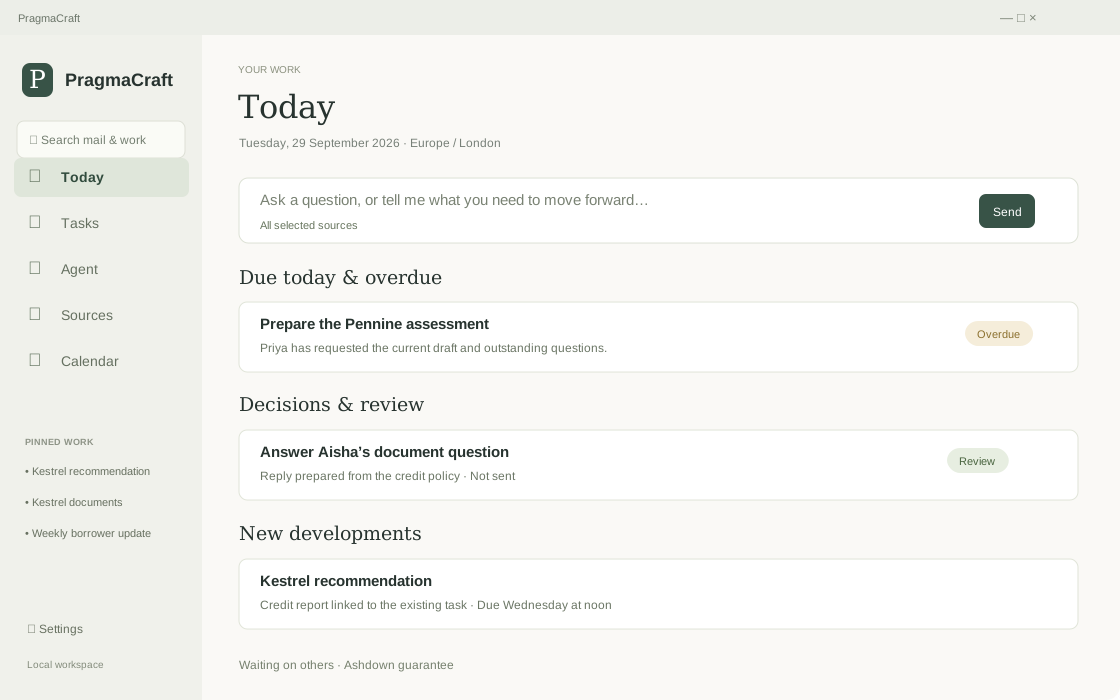
See how PragmaCraft brings sources, ongoing work, and the next decision together in one workspace.
A CLEARER WAY TO WORK
Find the context. Prepare the work. Stay with it as things change.
Search selected files and Outlook folders by keyword and meaning. Ask across documents, inspect references, and go back to the evidence behind an answer.
What documents are required for an import letter of credit?
The policy lists the order or contract, supplier invoice, goods and supplier details, and proposed shipment and payment dates.
Prepare email replies using the original message and relevant documents. Review and edit the draft before sending; your sources and the prepared work stay together.
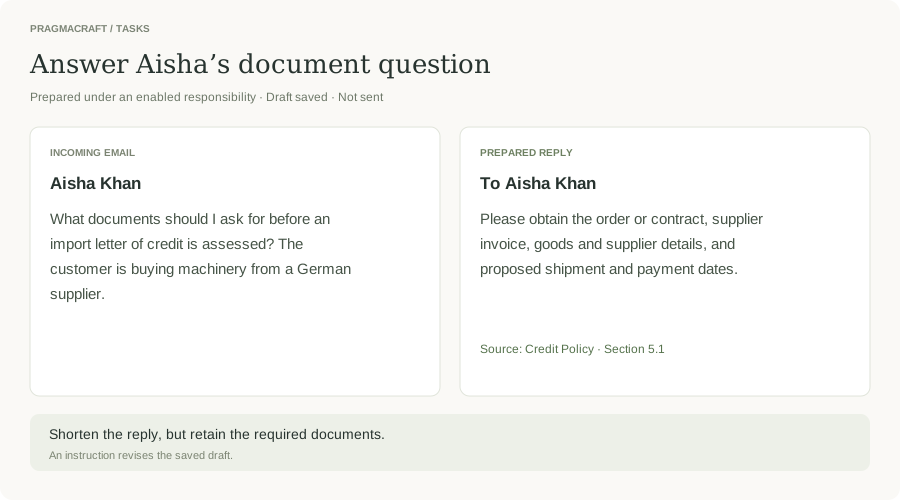
Prepare a reply to Aisha’s document question.
A draft reply brings together the required documents from the credit policy, ready for your review. It has not been sent.
Link incoming replies and attachments to an existing task. Update findings while retaining earlier correspondence, decisions, and outstanding requirements.
What is still outstanding for the Kestrel review?
Settlement certificates have arrived and need review. Readable annual accounts are still awaited. The recommendation remains open.
Saved task deadlines appear in the calendar. View selected Outlook appointments and confirm recurring preparation, with a separate result for each run.
Prepare a weekly borrower update every Tuesday.
A confirmed schedule prepares a dated update on the selected borrowers. The application must remain open for scheduled work.
FROM QUESTION TO FINISHED WORK
A question may remain a conversation. An instruction can become a task, continue an existing one, or prepare work for your review.
Select local files and Outlook folders. The Sources view shows processing status and files that could not be read.
Search by meaning and keywords. The agent can examine additional document sections or PDF pages and cite supporting evidence.
Bring relevant correspondence and documents into a task. Prepare a response, inspect the source material, and edit the draft before sending.
Link replies to existing tasks, update findings, see deadlines and confirm recurring preparation. You decide when a task is complete.
A CLOSER LOOK
In this banking example, the assistant brings a request and the relevant policy together in a draft. The user can revise it and review it before sending.
MADE FOR KNOWLEDGE WORK
Bring together policies, correspondence, and supporting evidence for questions that span multiple documents.
Find important details in selected Outlook folders and prepare replies with relevant source material.
Keep a task, its findings, incoming replies, and remaining requirements together as information changes.
See saved deadlines alongside selected Outlook appointments, and confirm recurring preparation.
DEPTH WHERE IT MATTERS
Multi-step questions, cross-document reasoning, and evidence reranking bring the right context into focus.
OCR, tables, scanned pages, charts, forms, and complex layouts become searchable knowledge.
Citations, source navigation, research traces, and evaluation help you review the result.
Keep selected correspondence, documents, findings, drafts, and next steps connected to the task.
YOUR WORK. YOUR CONTROL.
Choose the sources the assistant can use. Review outgoing correspondence. Confirm standing instructions and schedules, and decide when a task is complete.
Configure a model endpoint that fits your environment: local Ollama, an air-gapped enterprise model, or an online provider. Public-web research uses an online service.
GOOD TO KNOW
The local email and calendar connection requires Windows, activated Classic Outlook, and an available Outlook profile. New Outlook does not support this connection. AI features require a configured model connection.
Workspace records are stored locally in an encrypted database. For answers and preparation, relevant selected evidence is sent to your configured model endpoint. This can be local Ollama, an enterprise model in an air-gapped environment, or an online provider. Public-web research uses an online service.
You review outgoing correspondence before sending. Standing instructions and schedules require confirmation. Selecting sources or importing an archive does not itself authorize sending or create a task for every message.
Scheduled preparation, background processing, and the sending queue require the application to remain open. Available sources and configured usage limits also affect execution.
A project responsibility is a standing instruction for handling new material in a selected project. Once enabled, relevant incoming requests can start or continue tasks. Selecting sources or importing an archive does not by itself authorise sending or create a task for every message.
Saved task deadlines appear in the calendar, alongside appointments synchronised from selected Outlook calendars. A date mentioned in an email is not automatically a confirmed appointment: meeting proposals have a separate confirmation and invitation process.
You choose the sources the assistant can use and review outgoing correspondence before sending. Source processing, background work, and the sending queue can be paused separately. You decide when a task is complete.
PragmaCraft is the desktop evolution of our server-based Answie product. It brings the capabilities that can run locally into a personal workspace. For shared enterprise infrastructure and access control, explore Answie.
Contact info@pragmacraft.com for current pricing and availability. Tell us about your organisation, number of users, and intended use so we can discuss the right setup.
MEET YOUR NEXT WORKSPACE
Tell us how you work. We’ll help you explore PragmaCraft app and discuss pricing and availability.
Contact for pricingReşit Paşa Mah. Katar Cad. Teknokent ARI 4 Binası No: 2 / 50 / 3, Sarıyer / İstanbul